How to Use a VPN on Apple TV (2026): tvOS Apps and the Router Fallback
Yes, you can run a VPN directly on an Apple TV, as long as the box runs tvOS 17 or later. Apple added VPN support to tvOS in 2023, and NordVPN, Surfshark, ExpressVPN and Proton VPN all now publish native Apple TV apps in the App Store (App Store listings and provider pages, checked 9–10 Oct 2026). That covers the Apple TV HD and every Apple TV 4K. The original, second- and third-generation boxes can't install VPN apps at all; for those, the VPN has to live on your router or on a computer that shares its connection.
Most of what ranks for this query is coverage of the 2023 launch, written before most providers had shipped. Three years on, the useful questions are different: which apps exist now, whether your box qualifies, how sign-in works with a remote, and what a tvOS VPN app can't do compared with the same provider's iPhone app.
Can Apple TV run a VPN? (Yes, since tvOS 17)
Before 2023, tvOS simply had no way for an app to create a VPN tunnel. At WWDC23 Apple announced that "Network Extension support is added to tvOS", and that "VPNs are also newly supported in tvOS 17" (Apple developer session 10002). That framework is the same plumbing VPN apps use on iPhone and Mac, which is why the big providers could port their apps rather than invent something new.
In practice that means the Apple TV behaves like any other device on your account. You install the provider's app from the App Store on the TV, sign in, pick a location and connect. The tunnel then carries the Apple TV's traffic until you disconnect it or the box restarts and the app reconnects.
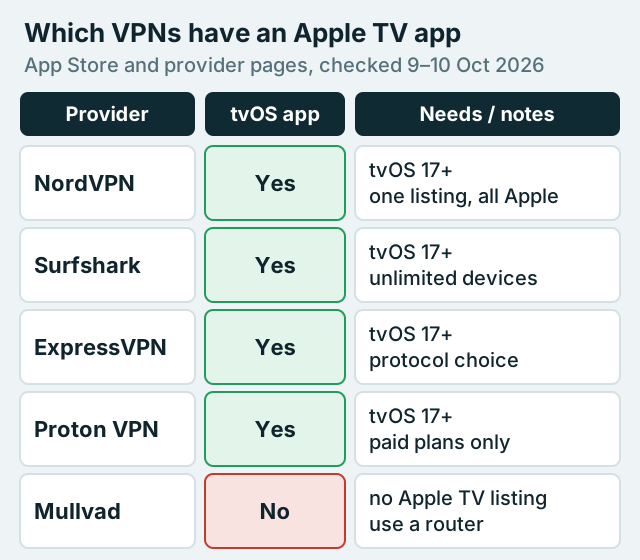
Which VPNs have tvOS apps (checked October 2026)
These are the providers with an Apple TV app confirmed on their own page or App Store listing. We list what each states, not test results; we haven't benchmarked Apple TV streaming speeds and won't invent numbers.
NordVPN on Apple TV
NordVPN's App Store listing states "Requires tvOS 17.0 or later" alongside its iPhone, iPad and Mac requirements, so one listing covers every Apple device you own. NordVPN also names tvOS among the platforms where its post-quantum encryption option is available; that option is opt-in and only works with its NordLynx protocol (NordVPN support, checked 9 Oct 2026). One NordVPN account covers 10 devices at once. Some links in this guide are affiliate links; a purchase through one can earn us a fee, your price stays the same, and the recommendations don't depend on it. If NordVPN suits your setup, you can see its current plans.
Affiliate link. We may earn a commission — it never moves a ranking.
Surfshark on Apple TV
Surfshark's Apple TV page says the app works on "Apple TV devices that support tvOS 17 and up", naming the Apple TV HD and Apple TV 4K, and its App Store listing confirms tvOS 17.0 or later. The reason to pick it for a living room is the account rule: unlimited simultaneous devices on a paid plan, so the TV never competes with phones for a slot. Surfshark is also frank that older Apple TVs can't run the app and points them to a router instead.
Affiliate link. We may earn a commission — it never moves a ranking.
ExpressVPN on Apple TV
ExpressVPN says its native app runs on Apple TV devices on tvOS 17 or later, that "every 4K model is fully compatible", and that the Apple TV HD works if it's on tvOS 17. Its Apple TV app lets you choose Lightway, WireGuard, OpenVPN or automatic protocol selection, save favourite locations and run a built-in speed test, which is more control than most tvOS apps offer. Plans allow 10, 12 or 14 devices depending on tier.
Affiliate link. We may earn a commission — it never moves a ranking.
Proton VPN on Apple TV
Proton VPN's Apple TV app needs tvOS 17 or later and, unlike Proton on phones, it's for paid subscribers only: Proton says it's "available to everyone with a paid Proton VPN subscription". Sign-in is designed around the remote. The TV shows a code, and you enter it with your account details at protonvpn.com/appletv in a browser on another device. You can then choose a country, or long-press a country to pick a city where Proton offers one.
Affiliate link. We may earn a commission — it never moves a ranking.
Not on Apple TV: Mullvad
Mullvad's App Store listing covers iPhone, iPad and Apple Vision, with no Apple TV requirement listed, so there's no tvOS app to install. If you use Mullvad, cover the Apple TV from a router running a WireGuard configuration instead.
| Provider | Apple TV app | Requires | Free plan on Apple TV | Devices per account | Worth knowing |
|---|---|---|---|---|---|
| NordVPN | Yes | tvOS 17.0+ | No free plan | 10 | Post-quantum option listed for tvOS (NordLynx, opt-in) |
| Surfshark | Yes | tvOS 17.0+ | No free plan | Unlimited | Older boxes: router suggested |
| ExpressVPN | Yes | tvOS 17+ | No free plan | 10 / 12 / 14 by plan | Protocol choice and speed test in the TV app |
| Proton VPN | Yes | tvOS 17+ | No (paid plans only) | 10 (Plus) | Sign in with a code from another device |
| Mullvad | No Apple TV listing | n/a | n/a | 5 | Use a router with WireGuard |
Which Apple TV models qualify
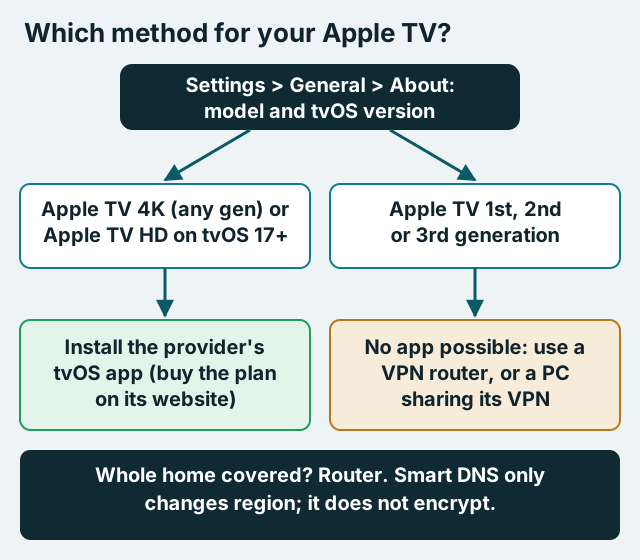
The dividing line is tvOS 17. Surfshark and ExpressVPN both state that the Apple TV HD and all Apple TV 4K models can run their apps on tvOS 17 or later, and that the first-, second- and third-generation Apple TVs can't. Those older boxes can't run tvOS 17, so no software update will bring them a VPN app.
To check your box, open Settings, then General, then About on the Apple TV. The model and the software version are listed there. If the version starts with 17 or higher, the App Store route is open to you. If the box is too old to show a recent tvOS at all, skip straight to the router section below.
Setup on Apple TV, step by step
The steps are almost identical across providers. Buy the subscription first, ideally on the provider's website for a reason explained in the next section, then do the rest from the sofa.
- On the Apple TV, open the App Store, search for your provider and install its app.
- Open the app and sign in. Typing a password with the remote is slow, so use a code-based sign-in if the app offers one (Proton's does).
- If tvOS asks whether the app may add a VPN configuration, allow it; the app can't create the tunnel without that permission.
- Connect to a location, starting with your own country, and check that the apps you use every day still play.
- Look in the app's settings for any option to reconnect automatically, so the box isn't left unprotected after a restart or power cut.
If you want the same VPN on the rest of the house too, setting it up once at the router means the Apple TV, consoles and smart TVs all inherit it. Our main guide explains what a VPN router is and how to set one up.
Buy on the web, not inside the Apple TV app
This is the detail the launch coverage never mentions. If you subscribe through the App Store on the Apple TV, the provider usually can't refund you. NordVPN's refund policy says it is "unable to issue refunds for payments made through the Apple App Store", and ExpressVPN says App Store and Google Play subscriptions "do not have access to the ExpressVPN 30-day money-back guarantee". Refunds for those purchases go through Apple instead, on Apple's terms.
Both providers offer a 30-day money-back guarantee on purchases made directly with them (NordVPN applies it to first purchases only). So buy on the provider's website, then sign in on the Apple TV with that account. You lose nothing by doing so, since the tvOS app is the same either way.
Older Apple TVs: router or hotspot
A first- to third-generation Apple TV has no way to run a VPN app, so the tunnel has to sit upstream of it. There are two workable options.
- A VPN router: the router runs the VPN client and every device behind it, Apple TV included, uses the tunnel. NordVPN notes that a router uses only one device slot on your account however many devices it protects. It's the most reliable fix and the only one that also covers consoles and TVs without apps.
- A computer hotspot: a Windows PC connected to the VPN shares that connection as a Wi-Fi hotspot, and the Apple TV joins it. ExpressVPN documents this as "PC sharing"; Surfshark warns that its Windows virtual-router method "won't provide full VPN functionality". It works for an evening, but the computer has to stay on and connected.
If you're choosing hardware for the router route, our guide to routers that handle a VPN well covers which ones run WireGuard comfortably, and the router versus app comparison sets out the trade-offs, chiefly that every device behind the router shares one location.
Smart DNS is not a VPN
You'll see Smart DNS offered as the fix for older Apple TVs. NordVPN's Apple TV guide, for example, has you activate SmartDNS in your Nord Account, which allowlists your home IP, then enter two DNS addresses under the Apple TV's network settings. Be clear about what it does: it changes the DNS servers the box uses so a streaming service sees a different region. ExpressVPN says of its own MediaStreamer equivalent that "it doesn't encrypt your traffic or provide the same privacy protections as a VPN". Use Smart DNS only if a region change for your own subscriptions is all you want.
Limits of tvOS VPN apps
A VPN app on Apple TV is a lighter thing than the same provider's iPhone app, and it helps to know where the gaps are before you rely on it.
- Fewer settings: Proton's Apple TV guide describes picking a country or city and nothing more, and Surfshark's Apple TV page doesn't list any TV-specific features. We found no kill switch or split tunnelling documented for tvOS by Proton or Surfshark. ExpressVPN's app is the exception, with protocol choice and a speed test.
- No free tier: Proton's free plan, the usual free recommendation on phones, doesn't extend to Apple TV.
- One location per box: you can't send one app through the VPN and another around it unless the provider documents split tunnelling on tvOS.
- Streaming services may still block you: many services block known VPN addresses, and using a VPN to reach another country's catalogue can breach their terms. Keep it to services you already pay for.
None of these is a reason to avoid the app on a box that supports it. They're reasons to set expectations: a tvOS VPN app is a privacy tool for the TV, not a full-featured security suite. If you need a fail-closed setup, put the VPN on the router, where the Apple TV can't reach the internet any other way. For a stick-based setup elsewhere in the house, our Firestick VPN guide covers the Fire OS and Vega OS split.
Which route should you take?
Choose the App Store app if your Apple TV is an HD or any 4K model on tvOS 17 or later and you want to switch locations from the remote. Choose a router if the box is older, if you use Mullvad, or if you want consoles and smart TVs covered by the same tunnel. For most households with a recent Apple TV, NordVPN or Surfshark is the simplest start, and Surfshark's unlimited devices remove the counting problem entirely. If you already know NordVPN fits, you can compare NordVPN's plans and buy on the web before installing the TV app.
Apple TV VPN FAQ
Does NordVPN work on Apple TV?
Can you put a VPN on any Apple TV?
Is there a free VPN for Apple TV?
Should I subscribe inside the Apple TV app?
Is Smart DNS the same as a VPN on Apple TV?
See the whole picture: our guide to what a VPN router is and how to set one up, or start with a VPN for Firestick.