Best VPN for Firestick: which apps work on your stick, and when the router wins
Four big VPNs now have apps for both kinds of Fire TV Stick, Fire OS and the newer Vega OS. What decides your pick is the stick you own, the features its app keeps, and whether the router should carry the VPN instead.
The best VPN for a Firestick in 2026 is the one with a native Amazon Appstore app for your exact stick, and NordVPN, ExpressVPN, Surfshark and Proton VPN all now support both Fire OS and the newer Vega OS sticks (vendor pages, checked 9–10 Oct 2026). NordVPN is our default pick for most people, Surfshark suits a house with many devices on one account, and Proton VPN is the only one of the four with a free plan that installs on a stick, though without streaming support. If your stick is a first- or second-generation model, no app will help you: put the VPN on your router instead.
That last point is the one most Firestick VPN lists skip. They rank providers as if every stick were the same device. It isn't. Amazon now ships two operating systems under the Fire TV Stick name, the oldest sticks can't run a VPN at all, and one feature people rely on (the kill switch) behaves differently on a TV than on a phone. Sort out which stick you have first, and the right VPN usually picks itself.
The quick pick
If you want the short version, here it is. Each pick below is based on what the provider's own Fire TV page and support documents say today, not on our own speed tests, because we don't run lab tests on streaming hardware and won't pretend otherwise.
NordVPN: the default for most Fire TV Sticks
NordVPN's Fire TV app is listed in the Amazon Appstore and, according to NordVPN, supports Vega OS devices including the Fire TV Stick 4K Select. Its Fire TV app keeps split tunnelling, which lets you send only some apps through the VPN. One account covers up to 10 devices at once, and a router counts as a single slot however many devices sit behind it (NordVPN support, checked 9 Oct 2026). Two honest limits: NordVPN says its kill switch is not available on the Fire TV Stick, and its Vega OS app temporarily lacks some features it hasn't itemised. Some links on this page are affiliate links; buying through one can earn us a fee, your price stays the same, and it never decides a recommendation. You can check NordVPN's current Fire TV plans.
Affiliate link. We may earn a commission — it never moves a ranking.
Surfshark: one account for every screen in the house
Surfshark says its Fire TV app is "fully compatible" with both the Android-based Fire OS and the Linux-based Vega OS, installed from the Amazon Appstore, and it needs at least Fire OS 5 on older sticks. The reason to choose it is the device rule: Surfshark allows unlimited simultaneous connections on a paid plan (its free trial is limited to 3 devices). If you have a Firestick in every room plus phones and laptops, that matters more than any single feature.
Affiliate link. We may earn a commission — it never moves a ranking.
ExpressVPN: separate apps for each stick type
ExpressVPN publishes two different Fire TV apps: one for Fire OS and a separate one for Vega OS, which it says "must be downloaded from a different link". Its support list covers the Fire TV Stick (3rd Gen), Lite, 4K, 4K Plus, 4K Max, Fire TV Cube, and both Fire OS and Vega OS versions of the Fire TV Stick HD. Plans allow 10, 12 or 14 devices depending on tier (ExpressVPN pricing page, checked 9 Oct 2026). If you read elsewhere that ExpressVPN isn't available on Vega OS, that was true of early listings and is no longer what ExpressVPN states.
Affiliate link. We may earn a commission — it never moves a ranking.
Proton VPN: a free plan that installs, with a catch
Proton VPN runs on Fire OS 7 and later through the Amazon Appstore, and it has a dedicated Vega OS app, because its Android app won't install on Vega OS. Its free plan installs and connects on both, but Proton states plainly that "streaming support is only available on paid Proton VPN plans". Free also means one device at a time and a server Proton picks for you from 10 countries. For a Firestick, whose whole job is streaming, the free plan is a way to test the app rather than a long-term setup.
Affiliate link. We may earn a commission — it never moves a ranking.
Fire OS vs Vega OS: why your stick model matters
Amazon began rolling out Vega OS in late 2025 as a Linux-based replacement for the Android-based Fire OS on newer Fire TV Sticks (Proton VPN). The practical difference for VPN users is simple: Fire OS sticks run Android-style apps, Vega OS sticks need apps built specifically for Vega. A provider's ordinary Android build won't run there, which is why Proton and ExpressVPN ship separate Vega apps while NordVPN and Surfshark say their Appstore listing covers both.
Amazon's own developer page talks only about "the next generation of Fire TV Sticks" and names no models. The models named by VPN vendors are the Fire TV Stick 4K Select, which runs Vega OS, and the Fire TV Stick HD, which ExpressVPN says exists in both Fire OS and Vega OS versions. That HD detail is the trap: two sticks with the same name can need different apps.
How to check which one you have
On the stick, open Settings, then My Fire TV, then About. Proton's guide says you'll see either "Fire OS" or "Vega OS" followed by a version number. Write it down before you subscribe to anything, because it decides which app you install and, for Proton, which download you need.
Sideloading is the wrong fix
On Fire OS, people used to sideload a VPN's Android package when the Appstore lacked it. Two things argue against that now. NordVPN warns that Amazon "may restrict VPN use on Fire TV Stick devices if it detects" a sideloaded VPN app, while official Appstore apps should not be blocked. And Vega OS doesn't run Android packages at all. With four major providers in the Appstore for both systems, there's no good reason to sideload a VPN onto a stick in 2026.
Availability matrix: provider by stick type
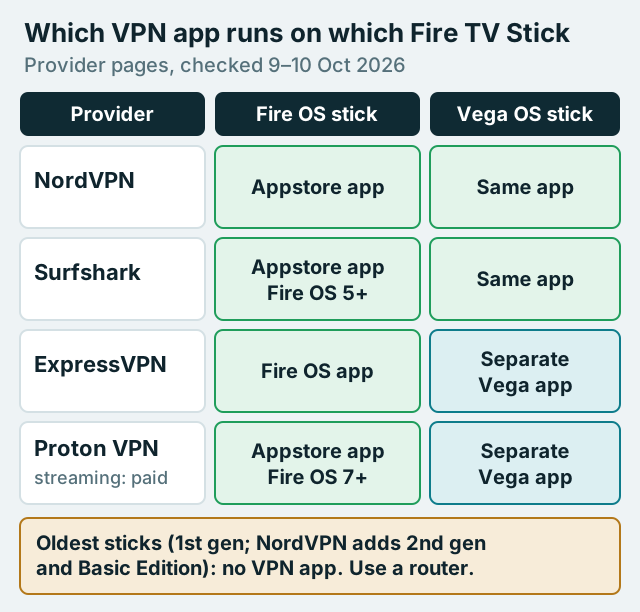
The matrix below is built from each provider's own Fire TV page or support article, read on 9–10 October 2026. "Appstore" means the provider says you install from the Amazon Appstore on the stick.
| Provider | Fire OS sticks | Vega OS sticks | Oldest support stated | Devices per account | Firestick caveat |
|---|---|---|---|---|---|
| NordVPN | Appstore app | Same app, supports Vega OS | Not 1st/2nd gen or Basic Edition | 10 | No kill switch on Fire TV Stick |
| Surfshark | Appstore app | Same app, Vega OS compatible | Fire OS 5; not 1st gen | Unlimited (trial: 3) | None stated |
| ExpressVPN | Fire OS app | Separate Vega OS app | Fire TV Stick 3rd Gen and Lite listed | 10 / 12 / 14 by plan | Vega app has its own download link |
| Proton VPN | Appstore app, Fire OS 7+ | Separate Vega OS app | Fire OS 7 | 10 (Free: 1) | Streaming support on paid plans only |
Notice what the table doesn't contain: a speed column. Fire TV speed depends on the stick, your Wi-Fi and the server you pick far more than on the brand, and we haven't run controlled tests. Any site that ranks Firestick VPNs by megabits without showing its method is guessing.
Install and settings that keep it on
On a supported stick, installation takes a few minutes. The steps below follow the order NordVPN and Surfshark both describe; the menu names on your stick may differ slightly.
- Find the provider in the Amazon Appstore on the stick (search from the home screen) and choose Get or Download.
- Open the app and sign in. Proton's Vega OS app also lets you sign in with a QR code or a code shown on screen, which saves typing a password with the remote.
- Connect to a server in your own country first, then confirm your usual streaming apps still play.
- Turn on any auto-connect or connect-on-launch option the app offers, so a power cut doesn't leave the stick unprotected after it restarts.
- If the app offers split tunnelling, consider excluding apps that don't need the VPN, such as local news or anything that blocks VPN addresses.
The kill switch question
On a phone, a kill switch stops all traffic the moment the VPN connection fails. On a Fire TV Stick you can't count on one. NordVPN says its Android kill switch isn't available on the Fire TV Stick, and the Fire TV pages we read from the other three providers don't document a kill switch that works on the stick itself. If a brief drop would matter to you, the router route below is the only setup that fails closed for every app on the stick, because the stick never touches the internet except through the router's tunnel.
When a streaming app refuses to play
If an app shows a proxy or VPN error, the service has flagged that server's address, not your setup. Switch to another server in the same country or exclude that app with split tunnelling. Remember that a VPN can conflict with a streaming service's terms, so keep it to services you already pay for, and don't expect it to be a reliable way around regional licensing.
Router route for unsupported sticks
A first-generation Fire TV Stick can't run any VPN, Surfshark says, and NordVPN adds the second generation and the Basic Edition to that list. For those sticks, and for anyone who wants every screen covered without installing anything, the answer is to run the VPN on the router. The stick then needs no app, no sign-in and no updates: it's covered the moment it joins your Wi-Fi.
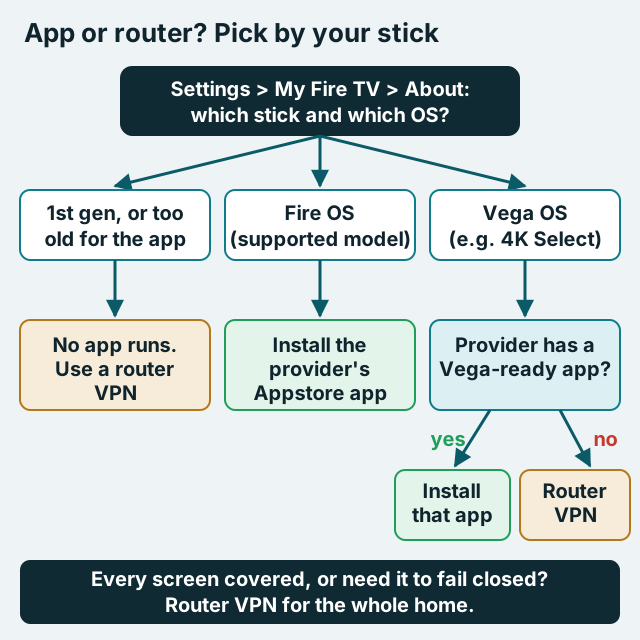
The router route has real costs. Every device behind the router shares one server and one country, so changing region means logging into the router rather than pressing a button on the remote. Encryption also runs on the router's processor, so an older router can become the bottleneck, especially on OpenVPN. If you're new to this, start with what a VPN router is and how to set one up, then pick hardware from our guide to routers that handle a VPN well.
A middle path many households use: keep a VPN app on the main living-room stick, where you want quick country changes, and let the router cover everything else. Because NordVPN counts a router as one device, that mix still fits inside a 10-device account. Before you buy anything, compare a router VPN with per-device apps to see which trade-offs you'd rather live with.
Free Firestick VPNs to avoid
"Free VPN for Firestick" is the biggest search in this cluster, and it's where most of the risk sits. A TV stick is a poor place to judge an unknown app: the interface hides permissions, the app sits next to your streaming and payment accounts, and a VPN by design sees every request the device makes. An unvetted free VPN on that device is a worse risk than no VPN at all.
If you want to try a VPN on a stick without paying, the honest option is a free plan from a provider with a published audit. Proton VPN's free plan installs on Fire OS 7+ and on Vega OS, and Proton's no-logs policy has been audited by Securitum every year, most recently in 2026 (its fifth consecutive annual audit). But read the limits: one device, a server chosen for you from 10 countries, and no streaming support. That makes it fine for checking that a VPN works on your stick and useless as a streaming tool. For streaming, a paid plan from a provider you can name and look up is the only setup we'd put on a TV.
What it costs after the first term
A Firestick VPN is a subscription you'll keep for years, so the renewal price matters more than the headline. These are US prices before tax from each provider's own pricing or renewal page, checked on 9 October 2026; they change often and vary by country, so confirm at checkout.
- Surfshark Starter: $2.49 a month on the two-year offer, billed $67.23 for the first 27 months, then $79 a year.
- ExpressVPN Basic: $2.99 a month on the two-year offer, billed $83.72 for the first 28 months, then $99.95 a year.
- Proton VPN Plus: $3.49 a month on the two-year offer, billed $83.76 for the first 24 months, then $83.88 a year.
- NordVPN Basic: $3.49 a month on the two-year offer when we checked on 12 Oct 2026, with $94.23 charged up front for 27 months, then $139.08 a year per NordVPN's own renewal table.
Every provider follows the same pattern: the low monthly number assumes a long first term, and the renewal is what you pay from then on. Proton's renewal sits closest to its intro bill, while NordVPN's is the steepest of the four. If you only need a VPN on one stick for a trip, a monthly plan you cancel afterwards can cost less than a two-year commitment you forget about.
Taking the stick on the road
One advantage of the app route is that it travels. A Fire TV Stick in a hotel room carries its own VPN app, while a router VPN at home does nothing for you once you've left the house. That makes the app the better choice if the stick spends weeks a year in hotels or holiday rentals.
Hotel Wi-Fi brings its own problem, though: many networks need you to accept terms on a sign-in page before anything works, and a TV stick is an awkward device for that. Connect the stick to the hotel network with the VPN off, complete the sign-in, then switch the VPN on. If the stick refuses to show the sign-in page at all, a small travel router that joins the hotel network once and shares a VPN-protected Wi-Fi network with your devices is the tidier fix, and it covers your phone and laptop at the same time.
Keep expectations realistic abroad. A VPN protects your traffic on someone else's network, but many streaming services license content by country and actively block VPN addresses, and using a VPN to reach another region's catalogue can breach their terms. Treat the VPN as privacy protection first.
Which setup is right for you?
Match your stick and your habits to one of these, and you're done.
- Fire OS stick, one TV, occasional country changes: install NordVPN or Surfshark from the Appstore and switch on auto-connect.
- Vega OS stick (for example the 4K Select): any of the four providers above, but install the Vega-ready app; with ExpressVPN and Proton that means their separate Vega download.
- First- or second-generation stick, or Basic Edition: no app will run; use a router VPN or replace the stick.
- Many screens and phones in one home: Surfshark's unlimited devices, or a router VPN that covers the lot as one connection.
- You need a fail-closed setup: a router VPN, since the stick's own apps can't promise a kill switch.
If NordVPN's balance of Vega support, split tunnelling and the router-as-one-device rule fits your home, you can see NordVPN's plans for Fire TV. For the step-by-step on the stick itself, our Firestick install walkthrough covers the remote-control details.