Travel Router With a VPN: How a Pocket Router Covers Hotel Wi-Fi and Every Device
A travel router with a VPN is a pocket-sized router that connects to the hotel, café or rental Wi-Fi once, runs the VPN itself, and gives all your devices a private Wi-Fi network that goes through the tunnel. Your phone, laptop, tablet and TV stick connect to it as if you were at home, without needing their own VPN apps. The model you choose decides your ceiling: GL.iNet's own published figures run from 65 Mbps of WireGuard throughput on its smallest Opal to 550 Mbps on the Slate AX (gl-inet.com, checked 9–10 Oct 2026).
Search results for this topic are mostly shop listings and one maker's product pages. None explains the part that trips people up in practice, which is the hotel's sign-in page, and none puts the published VPN speeds side by side. That's what this guide does, with the caveat up front that the speeds are the manufacturer's lab figures, not our measurements.
Why a travel router
Three problems push people toward a travel router. First, device count: a family trip can mean eight or ten devices, and some hotels limit how many can sign in to their Wi-Fi. The travel router signs in once and everything else connects behind it. Second, devices that can't run VPN apps, such as a Roku, an older Apple TV or a games console, can still use the tunnel through the router. Third, consistency: your devices see the same Wi-Fi name and password in every hotel, so they reconnect automatically and you set up the VPN once rather than per device.
It also helps with VPN account limits. NordVPN, for example, says "the router uses only one device slot" on an account that otherwise allows 10 devices at once (NordVPN support, checked 9 Oct 2026). A travel router turns a family's worth of gadgets into one connection.
The trade-off is one more thing to pack and power, and one shared VPN location for every device on the router. If you only ever travel with a phone, the VPN app on the phone is simpler.
How it works with hotel Wi-Fi (the captive portal flow)
Most hotel networks show a sign-in or terms page before they let you online. That page is called a captive portal, and it's the step where travel-router setups usually fail, because the VPN can't connect until the portal is cleared and the portal can't be cleared through a VPN that isn't connected yet.
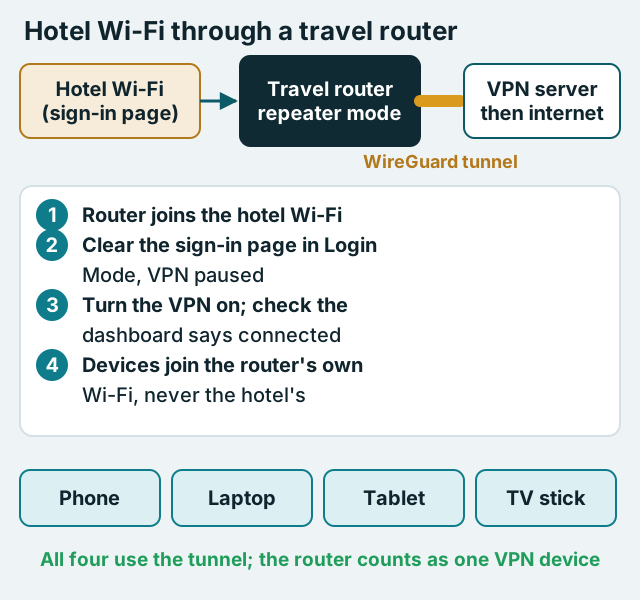
GL.iNet's firmware handles this with a feature it calls Login Mode. When the router joins a hotspot that has no internet access, it can enter Login Mode automatically, or prompt you to, so you can open the sign-in page from a connected phone or laptop. GL.iNet is candid about the cost: in Login Mode "some services will be suspended while the DNS mode will be switched to automatic", which it warns "may leak your network activity to the hotspot provider" (GL.iNet documentation, checked 10 Oct 2026). That's acceptable for the minute it takes to tick a box, as long as you finish the sign-in, leave Login Mode and let the VPN connect before you do anything private.
In practice the sequence looks like this:
- Power the router and connect your phone to the router's own Wi-Fi network.
- In the router's admin page, go to the Repeater section, choose the hotel network and enter its password if it has one.
- When the router reports no internet, let it enter Login Mode and complete the hotel's sign-in page on your phone.
- Leave Login Mode and switch the VPN on in the router; confirm the VPN dashboard shows it connected.
- Now connect your other devices to the router's Wi-Fi. They never touch the hotel network directly.
Some hotel portals ask you to sign in again after a set period. If that happens, repeat steps 3 and 4; it still takes less time than signing in every device separately.
Model table: published VPN throughput (vendor specs)
The table lists GL.iNet's own published VPN client speeds for five current travel models. GL.iNet states that its figures come from tests "conducted on a local network" in client mode and that "real world speeds may differ". Treat them as the ceiling for each processor, not as what you'll see over hotel Wi-Fi, which is usually the slower link anyway.
| Model | Wi-Fi | Processor | WireGuard (max) | OpenVPN (max) |
|---|---|---|---|---|
| Opal (GL-SFT1200) | Wi-Fi 5 | SF19A28 dual-core 1 GHz | 65 Mbps | 12 Mbps |
| Slate Plus (GL-A1300) | Wi-Fi 5 | IPQ4018 quad-core ~717 MHz | 170 Mbps | 28 Mbps |
| Beryl AX (GL-MT3000) | Wi-Fi 6 | MT7981B dual-core 1.3 GHz | 300 Mbps | 150 Mbps |
| Slate 7 (GL-BE3600) | Wi-Fi 7 | Qualcomm quad-core 1.1 GHz | 490 Mbps | 385 Mbps (with DCO) |
| Slate AX (GL-AXT1800) | Wi-Fi 6 | IPQ6000 quad-core 1.2 GHz | 550 Mbps | 560 Mbps (with DCO) |
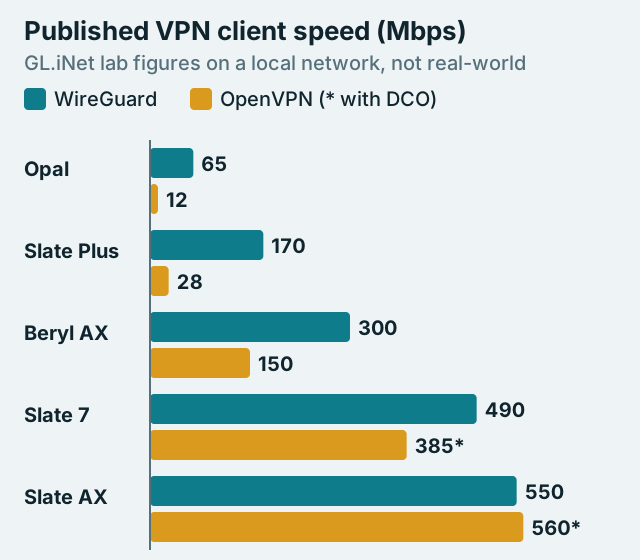
Two things stand out. On the older and smaller chips, WireGuard is several times faster than OpenVPN: the Slate Plus is rated at 170 Mbps for WireGuard and 28 Mbps for OpenVPN. On the newer models, the gap narrows because GL.iNet's figures for OpenVPN assume DCO (Data Channel Offload), which moves OpenVPN's packet handling into the kernel. And newer doesn't mean faster on paper: the Wi-Fi 7 Slate 7 is rated below the older Slate AX for VPN throughput. Pick by the processor's published VPN number, not by the Wi-Fi generation on the box.
For most hotel stays, a model rated around 300 Mbps on WireGuard leaves headroom over typical hotel connections. The Opal's 65 Mbps is enough for one or two HD streams, but it's the model where the router itself is most likely to be the bottleneck.
Setting up WireGuard on a travel router
WireGuard is the protocol to use on a travel router. It's built into GL.iNet's firmware and into OpenWRT, it's light on small processors, and every model above is rated faster on it than on OpenVPN without DCO.
GL.iNet's WireGuard client has two ways in. For providers it integrates directly, you sign in on the router and it generates the server configurations for you. GL.iNet's documentation lists AzireVPN, Hide.me, IPVanish, Mullvad, NordVPN, PIA, PureVPN, Surfshark, Windscribe and X-VPN, with sign-in by username and password for most, by account number for Mullvad, and by an access token you generate in your NordVPN account for NordVPN (checked 10 Oct 2026). For any other provider, you download a WireGuard configuration file from the provider's website and upload it with the Add Manually option.
Proton VPN is the main example of the manual route. In your Proton account, open Downloads and choose WireGuard configuration, pick a server and options, and download a .conf file. Proton notes that its WireGuard follows the open specification, so any compliant client, including those built into routers, can use the file. Upload it to the router and connect. Our router setup guide covers the same steps on a home router, and our explainer on what a VPN router is covers how router-level coverage works in general.
Kill switch and DNS settings
A router VPN is only as private as its failure mode. If the tunnel drops on a hotel network and the router quietly falls back to the hotel connection, every device behind it is exposed without knowing it.
GL.iNet's VPN dashboard gives you two controls for this. Each tunnel has a kill switch that, in GL.iNet's words, blocks traffic matching that tunnel "if the VPN connection fails unexpectedly". Separately, a global option called Allow Non-VPN Traffic is enabled by default "to ensure normal internet access for non-VPN traffic"; turning on the Enhanced Kill Switch instead "forces all devices to access the Internet through a VPN" (GL.iNet documentation, checked 10 Oct 2026). On a travel router that only exists to carry a VPN, the stricter setting is usually the right one.
Remember the interaction with the sign-in page. A strict kill switch is exactly what stops the hotel's portal from loading, which is why Login Mode exists. Clear the portal first, then make sure the VPN and the kill switch are both on before your devices go online. GL.iNet credits the kill switch with preventing DNS leaks, which matters because the hotel's DNS is the easiest place for a network operator to see which sites you visit.
Which VPNs provide router configs
Any VPN that offers WireGuard configuration files, or that GL.iNet integrates, will work on a travel router. Here's how the main options compare for this specific job.
- NordVPN: built into GL.iNet's WireGuard client via an access token, and the router counts as one of your 10 device slots.
- Surfshark: built into GL.iNet's WireGuard client by username and password; Surfshark's paid plans allow unlimited devices, so the router never crowds out your phone.
- Proton VPN: manual .conf files from your Proton account; works on any WireGuard-capable router.
- Mullvad: built into GL.iNet's client by account number; no affiliate programme, so we earn nothing recommending it, and it's a good fit if you want minimal account data.
- ExpressVPN: GL.iNet lists a Fortify (GL-MT6000) model labelled "ExpressVPN Built-in", and ExpressVPN's own setup guides describe Fortify as a GL.iNet router with ExpressVPN built in (checked 10 Oct 2026). We haven't checked its specs or price, so confirm the details on ExpressVPN's site before buying.
This section contains affiliate links; a subscription through one can earn us a fee, it doesn't change what you pay, and it plays no part in which services we suggest. If you want the least setup, NordVPN or Surfshark sign in directly on GL.iNet routers; you can check NordVPN's plans or see Surfshark's plans. If you'd rather download configurations yourself, Proton VPN lets you create WireGuard files for a router from your account.
Limits worth knowing before you pack one
A travel router doesn't solve everything. It can't make a slow hotel connection faster; it adds a small amount of encryption overhead on top. Every device behind it shares one VPN location, so if one person needs a home-country streaming service and another needs local results, someone has to compromise, or you use per-device policies where the firmware supports them. Streaming services may also block VPN addresses, and using a VPN to reach a different country's catalogue can breach their terms.
Some networks block VPN connections outright, typically office, campus and some public networks. A travel router can't fix that on its own; the answer is whatever obfuscation option your provider offers, if it works on routers. And in countries where VPN use is restricted, check the local rules before you travel. The router is a convenience and a privacy layer, not a licence.
If you already own a home VPN router and want the same coverage on the road, the travel router is its pocket-sized twin. For bigger home hardware, see routers that handle a VPN well, and for a ready-made option see pre-flashed VPN routers.
Travel router VPN FAQ
What is a travel router with a VPN?
How fast is a VPN on a travel router?
Does a travel router work with hotel Wi-Fi sign-in pages?
Which VPNs work on a GL.iNet travel router?
Does a travel router count as one device on my VPN plan?
See the whole picture: our guide to what a VPN router is and how to set one up, or start with a VPN for Firestick.