Roku VPN: Why Roku Can't Run a VPN App, and the Three Ways Around It
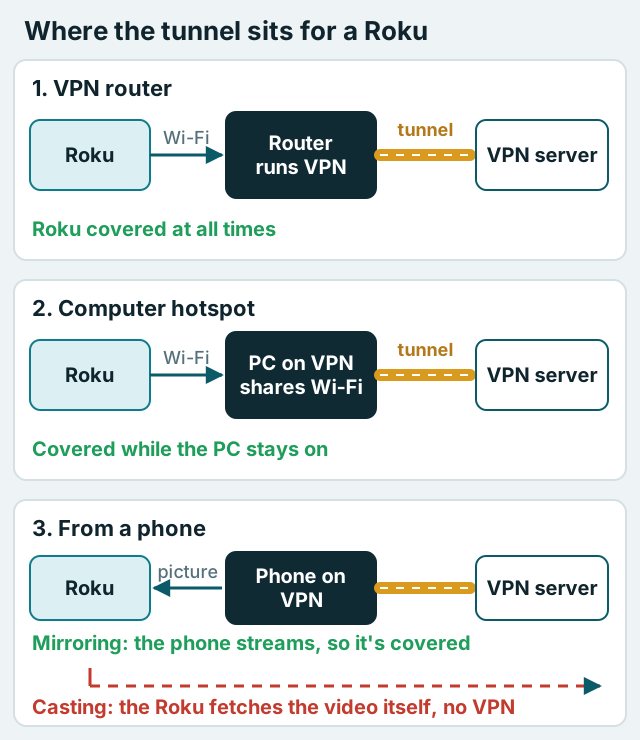
No, you can't install a VPN on a Roku. Roku OS doesn't support VPN apps, which NordVPN and ExpressVPN both state in their own Roku guides, and that applies equally to Roku streaming sticks and to TVs built on Roku's software. To put a Roku behind a VPN you have three options: run the VPN on your router, share a VPN connection from a computer as a hotspot, or mirror a VPN-connected phone to the TV. Only the first two route the Roku's own traffic through the tunnel.
That last distinction is where most Roku VPN guides go wrong. They list casting from your phone as a method without saying that casting usually doesn't send anything through the phone at all. Below we compare the three methods by what each one actually protects, what it costs and how much effort it takes, with a diagram for each.
Can you install a VPN on Roku? (No, and here's why)
VPN apps need the operating system to let them create a network tunnel and route traffic into it. Phones, computers, Apple TV (since tvOS 17) and Android-based TV sticks all provide that. Roku OS doesn't. NordVPN puts it bluntly: the Roku "runs on Roku OS, which is not supported by NordVPN, so you can't install the NordVPN app on Roku." ExpressVPN's guide says the same: "Roku devices don't natively support VPN apps" (both checked 9–10 Oct 2026).
So any channel in the Roku store with "VPN" in its name can't be a system-wide tunnel for the device in the way a VPN app is on a phone. If you find one, read exactly what it claims to do before you trust it with anything.
The fix in every case is to put the VPN somewhere upstream of the Roku, so its traffic passes through a tunnel the Roku doesn't need to know about. There are three places to put it.
Method 1: VPN router
Run the VPN client on your router and the Roku is covered the moment it joins Wi-Fi, along with every other device on the network. Both NordVPN and ExpressVPN list this first in their Roku guides. It's the only method that covers the Roku permanently, survives restarts and needs no other device switched on.
You have three ways to get there. A router with a built-in VPN client (many Asus models, GL.iNet routers) just needs your provider's configuration imported. A router that supports open firmware can be flashed with OpenWRT, which includes WireGuard. Or you can buy a router sold ready-configured for a provider; ExpressVPN's Roku guide points to Fortify, a GL.iNet router with ExpressVPN built in, and notes that this route "requires purchasing additional hardware." Our guide to what a VPN router is and how to set one up walks through the choices, and the step-by-step router setup covers importing a configuration.
The costs are real but one-off. You may need a router that can encrypt at your connection's speed, and the whole house shares one VPN location until you change it in the router's settings. A VPN router also counts as only one device on most accounts; NordVPN says "the router uses only one device slot" however many devices sit behind it (checked 9 Oct 2026). A few links in this guide are affiliate links. If you subscribe through one, we can be paid a fee; your price is unchanged and the fee has no say in our recommendations. If you plan to run NordVPN on a router, you can check its current plans.
Put only the Roku through the VPN
A whole-house VPN isn't always what you want. Banking apps, work laptops and games can all object to a VPN address, and you may only care about the Roku. Many VPN-capable routers let you choose which devices use the tunnel. GL.iNet's firmware, for example, applies "VPN policy" rules by client device or by destination, and its tunnel options include a kill switch that blocks traffic matching that tunnel "if the VPN connection fails unexpectedly" (GL.iNet documentation, checked 10 Oct 2026). Asus routers running the Asuswrt-Merlin firmware offer similar per-device routing.
With a policy like that, the Roku goes through the VPN and everything else uses your normal connection. It's the closest a Roku will get to having its own VPN app, and the router's kill switch gives it the fail-closed behaviour that most TV apps can't promise. If your router can't do per-device rules, a small second router in front of the Roku, running the VPN on its own Wi-Fi network, achieves the same split.
Method 2: computer hotspot
A computer connected to a VPN can share that connection as a Wi-Fi hotspot, and the Roku joins the hotspot instead of your normal network. NordVPN's Roku guide links to its instructions for sharing a NordVPN connection from Windows, and ExpressVPN describes the same idea as a "virtual VPN router" on Windows, warning that "this option requires technical knowledge and may not be suitable for everyone."
This route costs nothing extra if you already have a Windows laptop with Wi-Fi, and it's handy in a hotel room or a rental where you can't touch the router. The drawbacks are practical. The computer has to stay on, awake and connected for as long as you watch. Hotspot sharing settings can break after an operating-system update. And Surfshark, describing a similar Windows virtual-router method for older Apple TVs, cautions that it "won't provide full VPN functionality," so expect it to be less dependable than a router.
To set it up in outline: connect the VPN on the computer, turn on the computer's mobile hotspot feature, then on the Roku go to the network settings and join the hotspot's Wi-Fi name. If the Roku shows no internet, the VPN adapter usually isn't the one being shared; your provider's own guide shows which adapter to pick.
Method 3: from your phone (mirror, don't cast)
This is the method most guides oversimplify. Your phone can show content on a Roku in two different ways, and only one of them uses the phone's VPN.
Screen mirroring copies your phone's whole screen to the TV. The phone is doing the streaming: it fetches the video over its own connection, which is your VPN if the VPN is on, and sends the picture to the Roku. Roku says mirroring needs the phone to stay on for the whole session and works from compatible Android and Windows devices; Apple devices can mirror to Roku models that support AirPlay.
Casting works differently. When you tap the cast icon in an app like YouTube or Netflix, Roku says you can then use your phone for something else or switch it off once playback starts. That's only possible because the Roku opens its own copy of the app and fetches the video directly from the internet. So the stream doesn't pass through your phone or its VPN at all. The phone is acting as a remote, not a relay.
The practical rule: if you want the VPN to cover what you watch through a phone, mirror the screen with the VPN switched on, and accept lower picture quality and a phone that can't do anything else meanwhile. If you cast, assume the Roku's traffic is going out over your normal connection.
Comparison: what each method protects
The table compares the three methods on the questions that matter. "Covers the Roku" means the Roku's own internet traffic goes through the VPN.
| Method | Covers the Roku's own traffic? | Extra hardware | Effort | Changing country | Best for |
|---|---|---|---|---|---|
| VPN router | Yes, always | A VPN-capable router, if yours isn't | Medium, once | In the router's settings; whole house changes | Permanent home setup |
| Computer hotspot | Yes, while the computer is on | None if you have a Windows laptop | Medium, each session | In the VPN app on the computer | Hotels and short stays |
| Phone screen mirroring | Only the mirrored picture | None | Low | In the phone's VPN app | One-off viewing |
| Phone casting | No | None | Low | Not applicable | Not a VPN method |
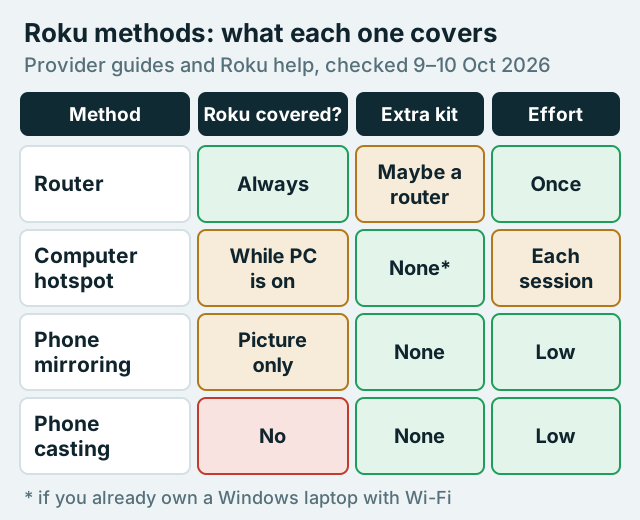
For most households the router is the answer, because it's the only method that keeps working after you've stopped thinking about it. The hotspot is the travel fallback. Mirroring is fine for an evening, and casting shouldn't be counted as a VPN method at all.
Roku and Smart DNS
Smart DNS services change the DNS servers a device uses so that some streaming services see a different region. You'll see them recommended for Roku because they don't need an app. Two cautions apply.
First, Smart DNS isn't a VPN. It doesn't encrypt anything or hide your IP address from your internet provider; ExpressVPN says of its own Smart DNS feature that "it doesn't encrypt your traffic or provide the same privacy protections as a VPN." Second, you generally can't set it on the Roku itself. Roku's menus don't offer a custom DNS field, a limitation repeated across user forums, and we couldn't find a Roku page confirming it either way, so the usual approach is to set the DNS servers on the router instead, which changes them for every device in the house.
If your goal is privacy on your own network, Smart DNS does nothing for you. If your goal is reaching your own home-country subscriptions while away, a VPN router or a travel router is the more complete tool, though streaming services can still block VPN addresses and some treat region-switching as a breach of their terms.
Troubleshooting a Roku behind a VPN
Most problems on the router and hotspot routes have a cause you can check in a minute.
- The Roku says it has no internet: the VPN on the router or computer has dropped and its kill switch is blocking traffic, or the hotspot is sharing the wrong network adapter. Reconnect the VPN first, then check the sharing settings.
- A streaming channel shows a proxy or location error: the service has flagged that VPN server. Try another server in the same country. On a router, that change affects every device on the tunnel.
- 4K buffers or drops to HD: the router's processor may be the bottleneck. WireGuard is far lighter than OpenVPN on router hardware, so switch protocol if your router offers both, and pick the nearest server that meets your need.
- Everything else in the house is slower too: use per-device rules so only the Roku uses the tunnel, as described above.
If none of that helps, test without the VPN for a moment. If the channel plays normally on your ordinary connection, the issue is the server or the service's VPN blocking, not your Roku. For more on how much a router VPN costs you in speed, see whether a router VPN slows your network.
Which method should you use?
Choose based on where the Roku lives and how long you need it covered.
- Roku at home, always covered: a VPN router. One setup, every device included, and it counts as one device on your VPN account.
- Roku in a hotel or rental: a computer hotspot, or a small travel router if you do this often.
- Watching one thing from your phone: mirror the screen with the VPN on; don't rely on casting.
- You only want a different region for a service you pay for: Smart DNS on the router, accepting it gives no privacy.
If you're setting up the router route with NordVPN, its router guides and the one-slot rule make it a sensible default, and you can compare NordVPN's plans before you start. ExpressVPN is the alternative if you'd rather buy router hardware it supports directly; its guide lists Fortify, its router app for compatible Asus, Linksys and Netgear models, and manual configurations. ExpressVPN says security updates for that router app have ended (the firmware still works but gets no new security fixes), so on a third-party router prefer its manual configuration and check your model against its list. You can see ExpressVPN's options. For other TVs in the house, our smart TV VPN guide explains which ones can run an app themselves.
Roku VPN FAQ
Can you put a VPN on a Roku?
How do I use NordVPN on Roku?
Does casting from my phone to Roku use my phone's VPN?
Can I change the DNS on my Roku for Smart DNS?
Do Roku TVs work differently from Roku sticks?
See the whole picture: our guide to what a VPN router is and how to set one up, or start with a VPN for Firestick.